Building a Dynamic Bedrock Model Selection Serverless Application
Table of contents
- 1. Context
- 2. The Challenge
- 3. Architecture Diagram
- 4. Code
- 4.1. Evaluation script
- 4.2. Infrastructure code
- 4.3. Backend code
- 4.4. Front-end code
- 4.5. GitHub
- 5. Considerations and Limitations
- 5.1. Considerations
- 5.2. Limitations
- 6. Summary
- 7. Further Reading
1. Context
If you are studying for the AWS Certified Generative AI Developer - Professional exam, you might have considered the Exam Prep Plan in AWS Skill Builder as a resource.
The Exam Prep Plan discusses each domain and the corresponding tasks one by one. Tasks in many domains include bonus assignment challenges after covering the required knowledge.
This post presents a solution to the first part of the bonus assignment described in Task 1.2 of the Domain 1 Review section.
2. The challenge
The assignment is about creating an AI application that dynamically selects foundation models in Bedrock based on use cases.
The task is quite complex with many moving parts, so I decided to implement only the dynamic model selection logic for now.
Selecting the right model for a specific use case is critical for cost saving, latency optimization or response correctness. For example, there’s no point in using a large, more expensive model for a simple text summarization task, which is better suited to a small text model.
But what if our application covers multiple use cases?
One option is to implement dynamic model selection logic which automatically chooses the right model for a given use case.
This post describes a very basic model selection application using serverless AWS resources.
3. Architecture diagram
The architecture isn’t very complex:
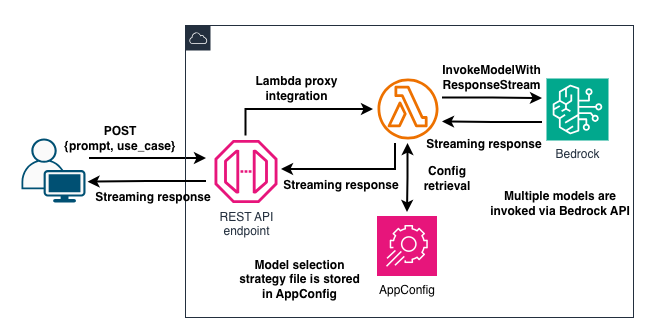
Users create a prompt in the UI and select a use case, like balanced or performance optimized, from a dropdown list.
Both the prompt and the selected use case are sent to an API Gateway REST API endpoint, which is integrated with a Lambda function. The function retrieves the model selection strategy configuration object from AppConfig, finds the best model for the use case and invokes it with the prompt.
4. Code
Let’s highlight some key elements from the code.
4.1. Evaluation script
To select the right model for a use case, we can evaluate and compare how the models perform.
We can use multiple methods and services to assess model performance, including Bedrock’s model evaluation jobs.
The solution in this post follows the bonus assignment suggestion to use custom assessment. I borrowed the main logic from the Exam Prep Plan, made some adjustments, and added test cases and metrics.
Each test case contains a question and a related ground truth answer. The evaluation script compares model responses to the provided ground-truth answers and scores the results in latency, similarity, and cost categories.
I made some modifications to the original code. As an example, the evaluation code provided in the Prep Plan includes a basic keyword check, which I replaced with cosine similarity to capture the semantic similarities between the ground truth and the model response.
I also changed the provided normalization method to min-max normalization to ensure all scores fall between 0 and 1. This way, when the script calculates the weights for each use case, the difference between lower and higher scores will be greater and more readable to the human eye.
Ultimately, the script selects the models that achieve the highest scores in each assessment category and pairs the model IDs with the corresponding use cases.
The last step is to create a JSON file with the model selection strategy configurations, which is then uploaded to AppConfig.
4.2. Infrastructure code
Contrary to the suggested bonus assignment solution, I wanted to use streaming responses in the application. This way, users receive the response token by token as the model generates them. And it looks cool, too.
I used the CDK in TypeScript to create application resources.
First, I want to configure streaming responses in both API Gateway and Lambda. Let’s start with API Gateway. For REST APIs, the stream configuration lives inside the method:
// create the "api" before
const generateResource = api.root.addResource('generate');
generateResource.addMethod(
  'POST',
  new apigateway.LambdaIntegration(modelAbstractionFn, {
    proxy: true,
    responseTransferMode: apigateway.ResponseTransferMode.STREAM,
    timeout: cdk.Duration.minutes(2),
  }),
  {
    // options
  }
)
We set STREAM on the responseTranserMode property (which defaults to BUFFER) to enable API Gateway to stream the response to the client. AWS introduced this feature a few weeks ago, and it comes in handy for generative AI and other, long-processing applications.
We can combine the API Gateway streaming response configuration with the increased timeout limit to ensure the client receives the response even if the model takes more than 29 seconds to create the output. The timeout setting allows up to 15 minutes instead of the standard 29 seconds for regional and private REST APIs.
As of this writing, increased timeout and streaming responses in API Gateway HTTP APIs are not supported.
4.3. Backend code
The code sample in the Exam Prep Plan is written in Python. But I wanted to use Lambda function response streaming! Currently, only the Node.js managed runtime supports this feature, so I took a deep breath and migrated the original Python code to TypeScript.
It wasn’t just a lift-and-shift job, since I made some minor changes as well. Instead of using the SDK and the (deprecated) GetConfiguration API, the model_abstraction.ts Lambda handler function uses the AppConfig Agent Lambda extension to retrieve the configuration from AppConfig.
The extension is added as a layer to the function and we can include it in the infra code like this:
const modelAbstractionFn = new lambdaNodejs.NodejsFunction(
  this,
  'ModelAbstractionFunction',
  {
    // .. other configurations
    layers: [
      lambda.LayerVersion.fromLayerVersionArn(
        this,
        'AppConfigLayer',
        // modify the URL to match your region
        'arn:aws:lambda:eu-central-1:066940009817:layer:AWS-AppConfig-Extension:261',
      ),
    ],
    environment: {
      APP_CONFIG_APPLICATION_NAME: appConfigApplication.name,
      APP_CONFIG_ENVIRONMENT: appConfigEnvironment.name,
      APP_CONFIG_CONFIGURATION: configProfile.name,
    },
  },
);
If you deploy the stack to a different region, you’ll need to select the correct extension ARN for that region.
The function’s execution role also needs the appconfig:GetLatestConfiguration and appconfig:StartConfigurationSession permissions, since AWS recommends these APIs over GetConfiguration.
The extension connects to AppConfig through port 2772. Here’s my implementation for the retrieveConfig function:
interface AppConfigProps {
  application: string;
  environment: string;
  configuration: string;
}
function retrieveConfig(
  configProps: AppConfigProps,
): Promise<http.IncomingMessage> {
  const { application, environment, configuration } = configProps;
  return new Promise((resolve) => {
    http.get(
      `http://localhost:2772/applications/${application}/environments/${environment}/configurations/${configuration}`,
      resolve,
    );
  });
}
The required values, application, environment and configuration, are provided via environment variables.
The function then parses the input event to get the prompt and use_case properties, extracts the model ID for the use case from the retrieved model selection strategy configuration, and calls the InvokeModelWithResponseStream Bedrock API. As chunks start arriving from Bedrock, we keep writing them to the response stream using responseStream.write. The response stream is created with the built-in awslambda.HttpResponseStream.from() method.
4.4. Front-end code
The minimalistic UI is also written in TypeScript using React.
We must ensure that the component (App.tsx) handles streaming responses and processes the incoming chunks. The user will now see the response appear on the screen gradually as pieces arrive from the backend.
4.5. GitHub
The code is available on my GitHub page in this repo.
5. Considerations and limitations
The project’s purpose is to present an idea. The solution is definitely not production-ready!
5.1. Considerations
Nova models
I use Amazon Nova models in the application. Feel free to add models from different vendors. In that case, you may need to modify the Lambda function’s code because the inference parameter configurations can differ.
Basic assessments
The custom model assessment presented in the code is very basic. Real-life assessments should consider more metrics and more complex business logic. Again, the idea is to have some basic metrics that can be used the generate a model selection strategy file, then select the model based on the configuration.
AppConfig
Using AppConfig isn’t mandatory, although it’s a good practice. It lets us modify the configuration without redeploying the application. This way, we delegate individual responsibilities to dedicated resources, following the separation of concerns principle.
Evaluation script
We can also run the evaluation script in the cloud instead of locally on the laptop. Since it takes time to invoke all models with all test cases, an asynchronous, event-driven workflow would work well here. I didn’t implement this pattern, as the project’s focus was the model selection logic itself.
Streaming
Most models support streaming operations, but not all of them. You can verify if your selected models support this feature before adding them to the pool.
5.2. Limitations
Authentication
The application doesn’t implement any authentication or access control for the API. Feel free to add a Cognito user pool or a similar service to protect the endpoint.
Prompt filtering
Prompt inputs aren’t validated, and sensitive data aren’t handled. You should implement this, for example, by using Bedrock Guardrails to filter model input and output.
Production environment
Other important production components, such as scaling and monitoring/observability, aren’t implemented either.
Correctness
As pointed out above, the bonus assignment code sample counts keywords in the model response and compares them to the ground truth. This method fails when the response is semantically correct but uses different wording from the ground truth, which is why I replaced it with a basic semantic similarity calculation in the code.
In real-world applications, both methods, individually and combined (in a hybrid approach), can have their place. For example, legal text usually requires exact word matching, so pure semantic similarity may not work well there. Always consider your specific use case when choosing an accuracy measurement method.
6. Summary
Task 1.2 in Domain 1 is about selecting and configuring foundation models. The solution described here implements a basic model assessment and selection logic that generates the model selection strategy configuration file.
AppConfig stores the file, while an API Gateway REST API provides the entry point to the application. REST APIs now support streaming responses, which, together with Lambda’s support for streaming, are handy features for generative AI applications.
7. Further reading
Exam Prep Plan: AWS Certified Generative AI Developer - Professional (AIP-C01 - English) - Exam preparation plan
Scale AI application in production: Build a fault-tolerant AI gateway with SnapSoft - A more robust architecture for production